前言
在我使用halo写文章时,为文章命名后,同时要设置一个文章别名用来访问,而默认生成的是以标题拼音命名,这样地址栏中会不美观,所以需要为文章生成一个唯一的ID。
实现方法
这里我参考了hexo-abbrlink这个项目,首先对文章标题进行一次CRC16/CRC32加密处理,生成一个ID,同时可选择是否以十六进制的形式显示。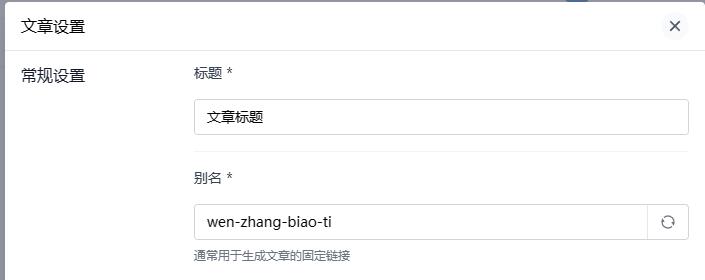
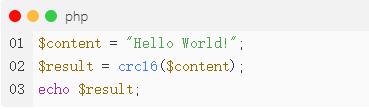
这里我用PHP进行编写,其中PHP自带了crc32()的函数,而crc16()需要自己实现,可以参考我的另一篇文章: 使用PHP实现CRC16算法
CRC16:
1 | function crc16($str): int { |
实现页面
为了方便使用,我打算在网页中放置一个表单,允许输入文字标题,选择加密算法,选择是否显示为十六进制
1 | <form> |
当提交后,会携带参数title、type(crc16 / crc32)、hex(on),下一步中将获取这三个参数。
实现功能
请求后显示值
当发送请求后,可以将传入的值显示到表单中(请求后默认会消失),下面代码只展示需要添加的部分
1 | <!-- ··· --> |
处理并显示结果
请求后,需要将处理结果显示到合适的位置,我将结果放置在提交按钮的下方
1 | if (isset($_GET["title"])) { |
执行效果
这样就实现了需要的效果了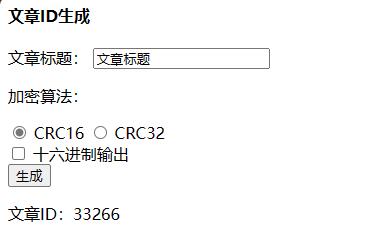
完整代码
1 | <html lang="zh"> |
结尾
这篇文章到这里就结束了,感谢耐心阅读,如果遇到问题可以在下方评论区中讨论。
本博客所有文章除特别声明外,均采用 CC BY-NC-SA 4.0 许可协议。转载请注明来源 小斯小站!
相关推荐
2024-04-25
使用PHP实现CRC16算法
简介Cyclic Redundancy Check循环冗余检验,是基于数据计算一组效验码,用于核对数据传输过程中是否被更改或传输错误。 计算流程 预置1个16位的寄存器为十六进制0xFFFF;称此寄存器为CRC寄存器 实现代码: 1$crc = 0xFFFF; 把第一个8位二进制数据(即通讯信息帧的第一个字节)与16位的CRC寄存器的低8位相异或,结果放入CRC寄存器中 实现代码: 1$crc=($crc>>8) ^ ord($str[$i]); 把CRC寄存器的内容右移一位(朝低位)用0填补,并检查右移后的移除位 实现代码: 1($crc & 0x0001) == 0 如果移出位为0:重复第3步(再次右移一位);如果移出位为1:CRC寄存器与0xA001进行异或 实现代码: 123456if (($crc & 0x0001) == 0) { $crc >>= 1;} else { $crc >>= 1; $crc ^= 0xa001;} ...
2024-03-24
从宝塔获取网站访问统计
介绍突然在宝塔中发现了一个非常不错的功能:没错,这个就是宝塔的网站监控,这个功能可用直接统计网站的访问量信息,相对准确很多,网上提供的接口可能会因为请求问题导致记录数量丢失,而宝塔的网站监控就可以从根源上进行记录请求,但是这个功能虽然很好,可是没有提供接口给我们使用,于是我决定研究并开发出一个获取其数据的接口。 寻找数据存放位置经过一番查找,我发现宝塔统计数据就存放在这里: 1/www/server/total/logs/站点名称 观察数据结构这个路径中,有一些.db文件,这些就是存储了统计信息的数据文件。其中用日期命名的是每天的访问记录,而我们需要的是总统计数据,所以需要total.db这个文件不难知道,这些是sqlite数据库的文件,我将total.db文件下载下来,并通过软件打开。 数据表于是发现这个数据库的结构是这样的 client_stat 客户端统计 用于记录访问过的客户端信息 ip_stat IP统计 用于记录访问过的IP地址 referer2_stat 来源统计 用于记录访问来源信息 request_stat 请求统计 用于记录请求 spider_stat 蜘蛛...

2024-04-25
深入浅出valine(二)配置SDK
前言这篇教程将讲解如何配置LeanCloud的SDK,用于编写Valine管理接口,安装SDK需要依赖Composer。如果你还没有安装Composer,可以参考教程:安装Composer教程 创建项目为了更方便的开发,我们需要使用PHPstorm创建一个项目,我将其命名为Valine-API下方的Add 'composer.json'复选框可选可不选,在安装SDK时会自动创建这个文件创建完成后,项目目录下打开终端,执行命令: 1composer require leancloud/leancloud-sdk 安装完成后,项目目录中会出现vendor文件夹,这个就是所有composer包安装的位置,同时还会出现composer.json文件,这个文件定义了当前项目需要依赖哪些包。接下来就可以愉快的开发了 结尾这篇教程到这里就结束了,感谢您的耐心阅读,如果你在安装的过程中遇到问题,可以在下方评论区中留言。

2024-04-25
深入浅出valine(三)编写代码
前言如果前面的步骤你已经完成了,那么在这个PHP项目中,你已经安装了LeanCloud的SDK,这篇文章将开始编写PHP的代码 拓展检查在编写代码之前,需要检查一些拓展是否启用,编辑php的配置文件,如果你不知道配置文件的位置,先执行这个命令 Windows1php -i | findstr php.ini Linux1php -i | grep php.ini 其中有个Loaded Configuration File,后面的路径就是配置文件,编辑这个文件,向下翻可以找到很多extension开头的行将curl取消注释,Windows系统中还需要将openssl取消注释 创建文件在项目中创建一个php文件,可以命名为main.php或index.php,这里我命名为main.php,在文件中加入基本标志 1<?php 接下来让composer装的包能够自动加载 1include "vendor/autoload.php"; 初始化客户端使用LeanCloud的SDK之前,需要先初始化LeanCloud的客户端 12use \LeanCloud\Clie...